For most businesses, WordPress is the right choice in 2026: a professional WordPress site costs $3,000–$15,000, launches in 2–8 weeks, and your team can edit it without a developer. A custom website built with frameworks like Laravel or Next.js costs $15,000–$100,000+ and is worth it only when you need unique workflows — customer portals, dashboards, complex booking or pricing logic, or an actual web application rather than a website. If your site's job is marketing, leads, and standard eCommerce, WordPress with WooCommerce does it faster and cheaper. If your site is the product, go custom.
That is the honest summary. The rest of this guide proves it with numbers — cost, speed, maintenance, security, and scalability — and ends with a simple decision framework you can apply to your own business in five minutes.
The Head-to-Head Comparison
| Factor | WordPress (+ WooCommerce) | Custom (Laravel / Next.js) |
|---|---|---|
| Typical build cost (USD, 2026) | $3,000 – $15,000 (stores to $35,000) | $15,000 – $100,000+ |
| Time to launch | 2–8 weeks | 2–6+ months |
| Who can edit content | Your team, no code | Depends — needs a custom admin or developer for structural changes |
| Speed potential | Fast when built well (see below) | Highest ceiling, especially Next.js |
| eCommerce | WooCommerce — mature, extensible | Fully tailored, at tailored prices |
| Maintenance | Updates for core, theme, plugins — routine but essential | Developer-led; no plugin updates, but every change is code |
| Security risk profile | Popular target; safe when maintained and hardened | Smaller attack surface; security depends on build quality |
| Scalability | Excellent for content/marketing sites | Excellent for applications and heavy logic |
| You own | Everything | Everything |
| Best for | ~80% of business websites and stores | Portals, SaaS, ERP-style tools, unique workflows |
Cost: The Real Three-Year Picture
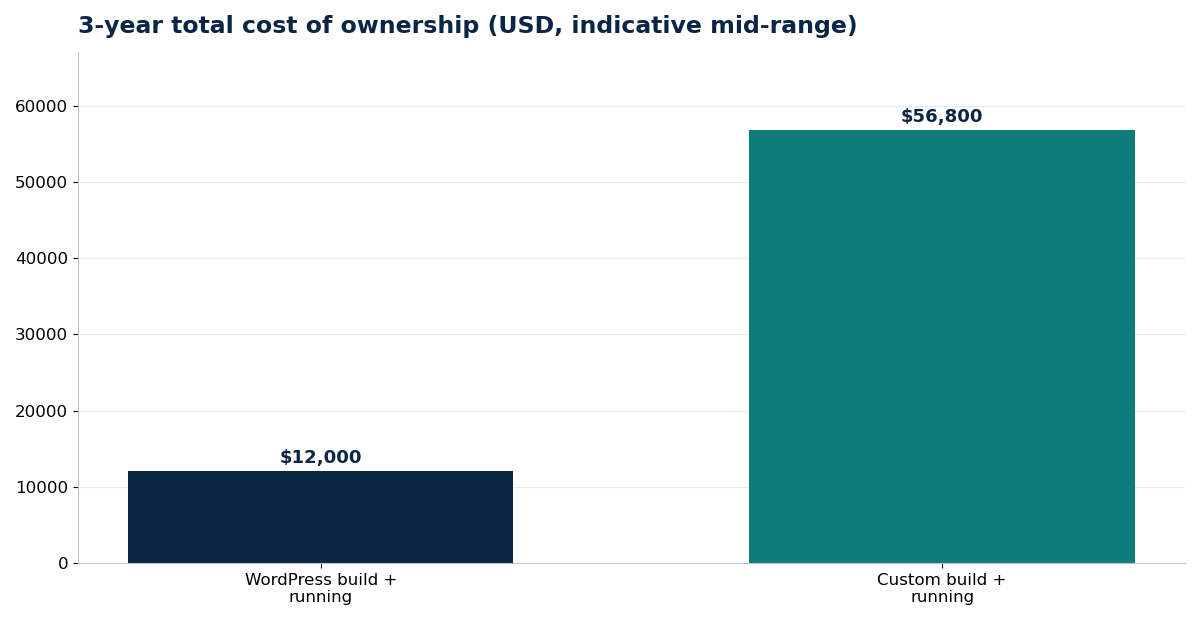
Up-front price is the wrong comparison. What matters is total cost over three years:
| Cost element (3 years) | WordPress business site | Custom website / app |
|---|---|---|
| Build | $6,000 (typical mid-range) | $40,000 (typical mid-range) |
| Hosting (3 years) | $900 | $1,800 |
| Maintenance (3 years) | $3,600 | $9,000 |
| One mid-life feature addition | $1,500 (often plugin-based) | $6,000 (custom development) |
| Indicative 3-year total | ~$12,000 | ~$56,800 |
Indicative mid-range market figures, 2026, for comparison only.
The conclusion is not "custom is overpriced." It is that custom development buys capabilities WordPress cannot sensibly provide. Paying custom prices for a brochure site wastes money; forcing a complex portal into WordPress with twenty plugins wastes money the other way — in fragility, slow pages, and a rebuild two years later.
Speed: What Actually Matters
You will hear two myths: "WordPress is slow" and "custom is always faster." Both are wrong.
A badly built WordPress site — bloated page builder, thirty plugins, uncompressed images, cheap shared hosting — is slow. A properly built WordPress site on good hosting, with lean tooling, image optimization, and caching, routinely scores in the green on Core Web Vitals. You can test your own media before rebuilding anything: run product and hero images through the free Image Compressor and Image to WebP Converter, because oversized images are the number one speed problem on business sites of every platform.
Custom builds, especially Next.js with static generation and edge delivery, have the higher speed ceiling and are the safer choice for application-like experiences with lots of interactive, logged-in screens. For a 15-page marketing site, that ceiling rarely justifies five times the budget.
Rule of thumb: if your pages are mostly read, WordPress can be just as fast in practice. If your pages are mostly used — dashboards, calculators tied to live data, personalised portals — custom pulls ahead.
Maintenance and Security: The Ongoing Reality
WordPress maintenance is predictable and cheap: core, theme, and plugin updates, backups, uptime and security monitoring — typically $50–$250/month in the US market. Its popularity makes it a target, which is precisely why staying updated matters; the overwhelming majority of hacked WordPress sites were running outdated components.
Custom sites have no plugin ecosystem to patch, but they are not maintenance-free. Framework and server updates, dependency security fixes, and every content-structure change still need a developer. Budget $250–$750+/month for a serious custom application, and make sure the code, repository, and hosting are in your name from day one — on either platform.
When WordPress Is the Right Answer
- Your site exists to win leads, calls, bookings, or standard online sales
- Your team needs to publish and edit pages, posts, and products themselves
- You want to launch in weeks and improve in phases
- Your budget is under roughly $20,000
- You value a huge ecosystem of proven tools over bespoke engineering
Plan it properly and WordPress is not a compromise. A structured pre-launch process — like the WordPress Business Website Launch Checklist — and page-by-page metadata planning with the Website SEO Metadata Worksheet are what separate WordPress sites that rank from ones that merely exist.
When Custom Is the Right Answer
- Customers or staff log in to do work: portals, dashboards, quoting engines, ERP-style workflows
- Your pricing, booking, or fulfilment logic does not fit standard plugins
- You are building a product (SaaS) rather than a marketing site
- You need integrations designed around your systems, not adapted to them
- Performance under heavy, logged-in, interactive use is a core requirement
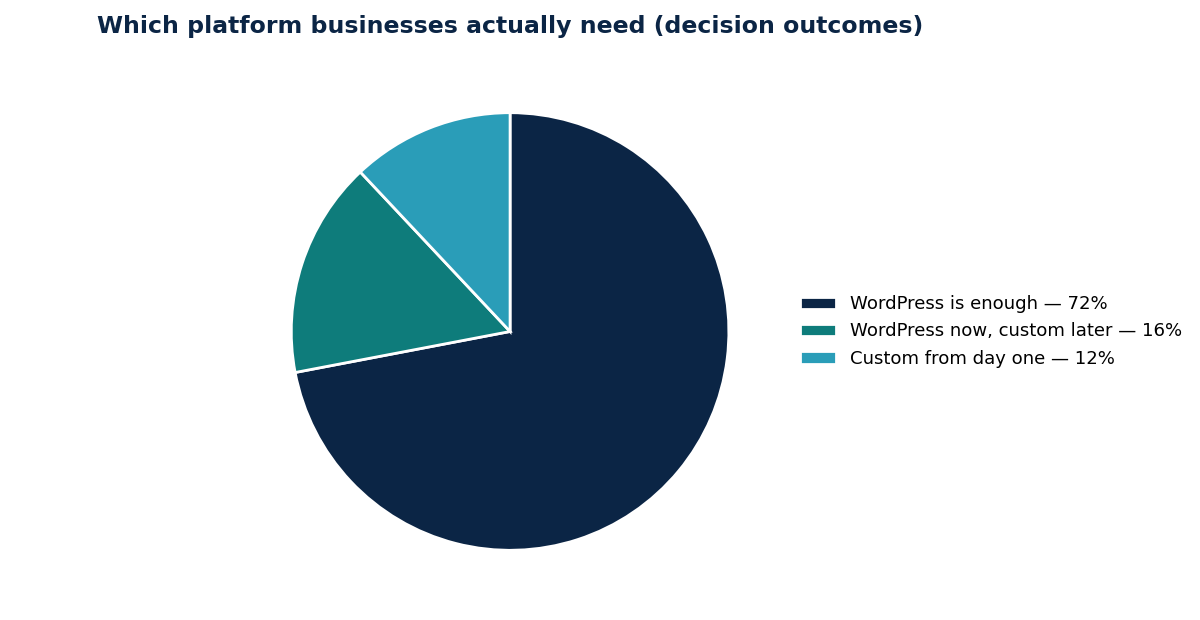
Many smart businesses do both in sequence: WordPress now to generate revenue and validate demand, custom later for the workflows that outgrow it. Asad Webs works exactly this way — WordPress and WooCommerce where they fit, Laravel and Next.js where they pay.
Platform Decision Guide: WordPress or Custom?
Answer five honest questions about what your website has to do. Each "yes" is a point for custom development; each "no" is a point for WordPress.
| Your situation | Points towards | Why |
|---|---|---|
| Users must log in to do work (portal, dashboard, tools) | Custom | Logged-in workflows are application behaviour, not page behaviour |
| Your pricing or booking logic does not fit standard plugins | Custom | Forcing unusual logic into plugins creates fragile, hard-to-maintain sites |
| The website IS your product (SaaS / application) | Custom | A product needs its own architecture, testing and release process |
| You need deep integration with a custom ERP or internal system | Custom | Integrations designed around your systems beat adapters and workarounds |
| Heavy interactive use by many logged-in users at once | Custom | Performance under concurrent interactive load is where custom builds earn their cost |
Score yourself:
- 0 yes answers: WordPress is almost certainly right for you — put the saved budget into content, SEO and marketing.
- 1–2 yes answers: Start on WordPress, and scope those items honestly as a later custom phase once the site is earning.
- 3–5 yes answers: Talk to a developer about a custom build — on WordPress those requirements would mean fighting the platform.
Conclusion
WordPress wins on cost, speed to market, and editability for the large majority of business websites in 2026; custom development wins when your website has to work like software. Decide by what your users need to do on the site — not by fashion, and not by the highest quote.
Not sure which side your project falls on? Asad Webs builds both, so the advice is not tied to one platform: describe your pages and features and get a straight recommendation with both prices where relevant. Browse the guides on the Asad Webs blog and practical resources in the shop while you decide.
Frequently Asked Questions
Is a custom website better for SEO than WordPress?
No. SEO depends on content, structure, speed, and technical setup — all achievable on WordPress, which powers a large share of top-ranking business sites. A custom site gives more control for complex applications, but it does not rank better by default.
Can a WordPress website really be fast?
Yes. Lean themes, few quality plugins, optimized images, caching, and good hosting put WordPress sites comfortably in the green on Core Web Vitals. Slowness usually comes from page builders, plugin overload, and oversized images — not the platform itself.
When does WordPress stop being enough?
When you need logged-in workflows, unique pricing or booking logic, deep ERP integration, or application-level interactivity. At that point plugins become workarounds, and a custom Laravel or Next.js build is the honest recommendation.
Can I start on WordPress and move to custom later?
Yes, and it is often the smartest path. Launch on WordPress to validate demand, keep your content and product data well organised, and commission custom development only for the features that outgrow the platform.
Which is more secure, WordPress or a custom website?
A maintained WordPress site and a well-built custom site are both secure; a neglected site of either kind is not. WordPress needs routine updates because it is widely targeted; custom sites need developer-led patching and secure coding practices.
Be the first to share a useful question or thought.